

Julian Tur
All work
Patitas logoPatitas — dog and cat
Role
Lead Product Designer
Timeline
10 months
Scope
Brand · Product · iOS / Android

Patitas

The branding of an application like Patitasis crucial for conveying its purpose, values, and unique personality. Patitas is not just an app to find lost pets; it's an emotional bond between pets and their owners — a community that comes together in the search and hope of reuniting furry families.

Our goal— to provide a secure, intuitive, and effortless user experience. To meet and exceed user expectations by delivering on the app's promises and enhancing pets' overall quality of life.

  • Through geolocation, users can easily find lost pets, nearby veterinarians, shelters, and pet stores, with all the essential details they need at a glance.

  • In-app messaging. Connect with any app user via direct messages, email, or even calls.

  • If you've lost your pet, don't worry. Post an alert and let the entire community see it and help you find them.

  • Profile creation. Like any social platform, you need a verified profile so others can see you're a real user of the app.

Proto-personas

To design effective solutions, it's essential to better understand the potential user profiles of the app. For this reason, proto-personas were created. These are based on research, observation, and conversations with real users.

The goal of these proto-personas is to understand:

  • Who will use the product.
  • What types of user profiles they have.
  • The contexts in which the product will be used and the users' expected behavior at that time.
Mateo portrait

Proto-persona

Mateo

Artist, musician · 29 years old · Guadalupe neighborhood

Age
29 years old
Location
Guadalupe neighborhood
Occupation
Artist, musician
Habits / Interests
Playing the guitar and singing
Values
Honest
Goals
To go on tour across the country and sign with a record label

General traits

Empathetic, honest, humble, and driven by a sense of justice.

Environment

Family, his band, colleagues, and social media.

Behavior patterns

  • He helps spread awareness on social media whenever he sees an animal living on the streets.
  • He is very familiar with using apps, especially social media platforms.

Frustrations

  • He is going through a difficult financial situation.
  • He wants a social network that provides information about pet shelters and connects people who care about animals and support responsible adoption.
Benchmark

Direct competitors to analyze: Chuby and Fauna City.
Strategic competitor to analyze: Instagram.

Across the three apps, the steps required to create a post were analyzed. These apps share similar functionalities and operate as social platforms, where users upload a photo and generate interactions with other users who view the post (sharing, liking, commenting, etc.).

  • Strengths:
    They are well established in society.

  • Weaknesses
    The steps required to create a post are lengthy. Fauna City and Chuby do not offer a user-friendly interface, and their iconography is confusing.

Benchmark table

SolidMixedFalls short
Steps to make a post
InstagramMixed
Fauna CitySolid
User-friendly design
InstagramSolid
Fauna CityFalls short
Categories on home page
InstagramSolid
Fauna CityMixed
Buttons
InstagramSolid
Fauna CitySolid
Search field on home page
InstagramSolid
Fauna CityMixed
Map for search on home page
InstagramFalls short
Fauna CityMixed
Saturation of space
InstagramSolid
Fauna CitySolid
Consistency across screens
InstagramSolid
Fauna CityMixed
Iconography
InstagramSolid
Fauna CityMixed

Userflow

Search flow for a veterinary clinic within the app

  1. App

    The user opens Patitas.

  2. Account check

    Do you have an account already?

    • Yes — straight to Log In
    • No — goes through the Log In screen first
  3. Log In

  4. Home

    Home offers four entry points. The user picks Search.

    SearchPostNotificationsEdit profile
  5. Search

    Search opens four categories. The user picks Veterinary.

    VeterinaryAdoptionPet loosesPet shop
  6. Veterinary

    The user lands on the veterinary clinic results.

Conclusion

It is essential to have a clean design with only the necessary text so users clearly understand the message being conveyed. When compared to the previously mentioned apps, it became evident that this project's design must be simple and easy to access. The goal of this app is to allow users to create a post in a single step, avoiding friction and eliminating unnecessary forms and options. It should be intuitive, easy to use, secure, and focused on improving pets' quality of life.

Considering that this app will be used by a wide age range, buttons must be clear, accessible, and designed in a user-friendly way.

Usability test

Helping pet owners find the vet

To test our prototype, usability testing was conducted with five participants between 18 and 35 years old.

The feedback collected was used to make improvements and refinements to the prototype.

Home screen wireframe — version 1

Version 1

Issue identified

Performance

Initially, the Home screen was designed with four buttons. When users were asked to find a veterinary clinic, 4 out of 5 participants looked for it the wrong way — through the “Near Me” section.
What surprised them was that this section only displayed posts about lost pets.

The “Adoption,” “Stores,” and “Shelters & Veterinary Clinics” screens were designed in a very similar way, which caused confusion.

Home screen wireframe — version 2

Version 2

Resolved

The solution

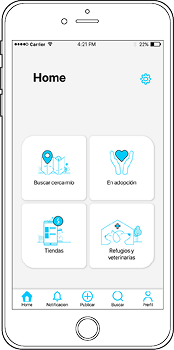
Combine the app's four main features into a single screen, presenting them in a more intuitive and visual way.

After analyzing the behavior above, this was the final result of the Home screen. All five users were able to successfully find a veterinary clinic and publish a post without any issues.

Positive feedback

  • The app is easy to understand, concise, and clean.
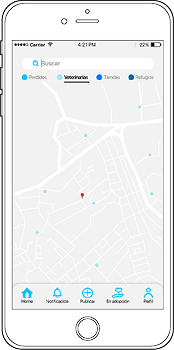
  • Searching for veterinary clinics on the map is very useful.
  • The overall functionality and button layout felt appropriate.
  • The options are very visual and extremely easy to understand.

Conclusion

Through the observation of this usability testing, it became clear that users were able to navigate the app quickly and confidently. This improvement was mainly due to consolidating the four main feature screens into a single, unified Home screen, which reduced cognitive load and simplified decision-making.

The information hierarchy and adequate spacing between icons allowed users to scan and understand the content effortlessly, creating a clearer and more accessible experience. These design decisions helped users complete key tasks—such as finding a veterinary clinic or publishing a post—without friction or confusion.

Throughout the process, we focused on designing for the user rather than as the user. By analyzing interview data and usability feedback, we identified real needs and pain points, ensuring that design decisions were grounded in research rather than assumptions. As a result, the final experience is intuitive, efficient, and aligned with user expectations, ultimately improving both usability and overall satisfaction.

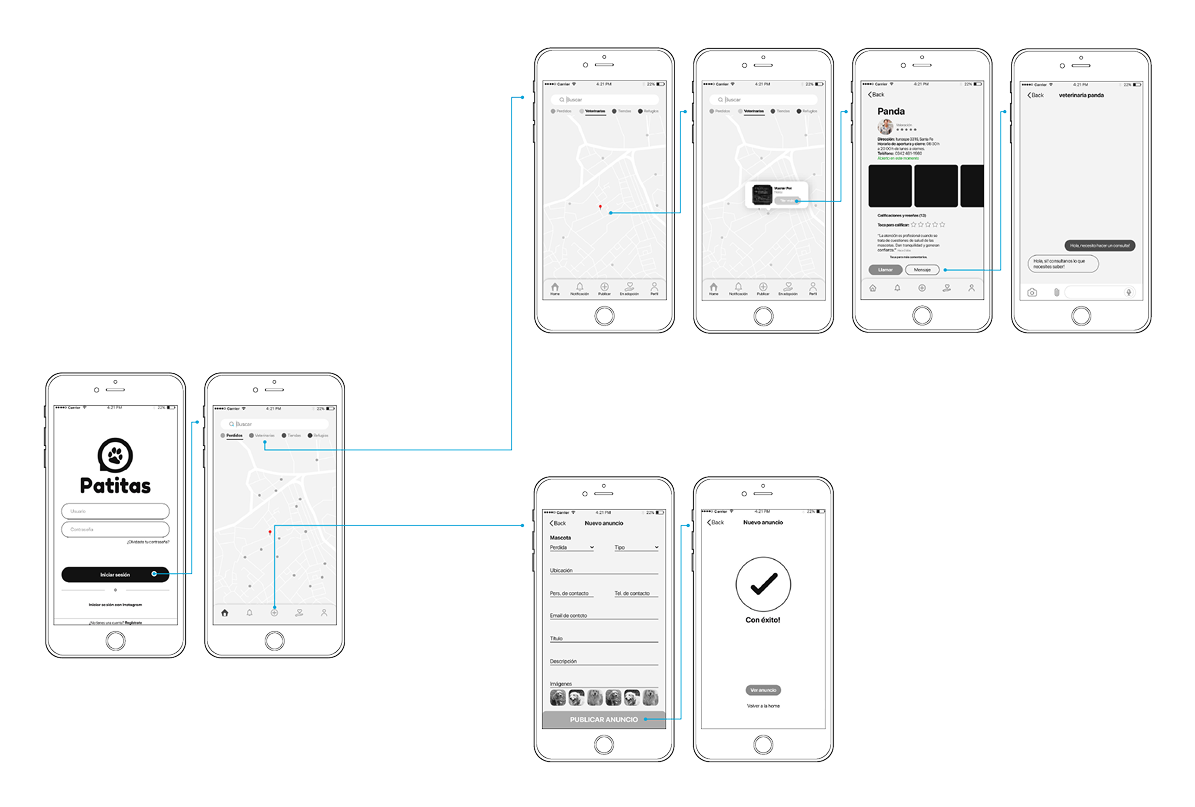
Wireframes

From search to post

Step of searching for a veterinarian and contacting.
Step of publishing an ad. This step consists of creating and publishing an advertisement with clear and relevant information, such as the purpose of the ad, key details, and contact information.

Wireframes flow — search for vet & publish ad

UI kit

Pictogram System Construction Grid

This golden ratio grid was used to build, size, and align the app's icons consistently, creating a cohesive icon system. The same grid was also applied in the construction of the logo.

Illustrations

This illustration system was used to visually support and guide users through the onboarding experience.

Icons

Buttons

  • Primary
  • Secondary
  • Tertiary
  • Disabled

Hover or press a button · Tab to reveal the focus halo

Brand color

Primary

#00A8DB

Note

This UI kit is a little part of the entire design system built for this project — the full system covers a complete token architecture, 40+ components, spacing and type scales, interaction specs, and contribution guidelines across the product. Only the most relevant highlights are shown here to keep the case study a comfortable read.

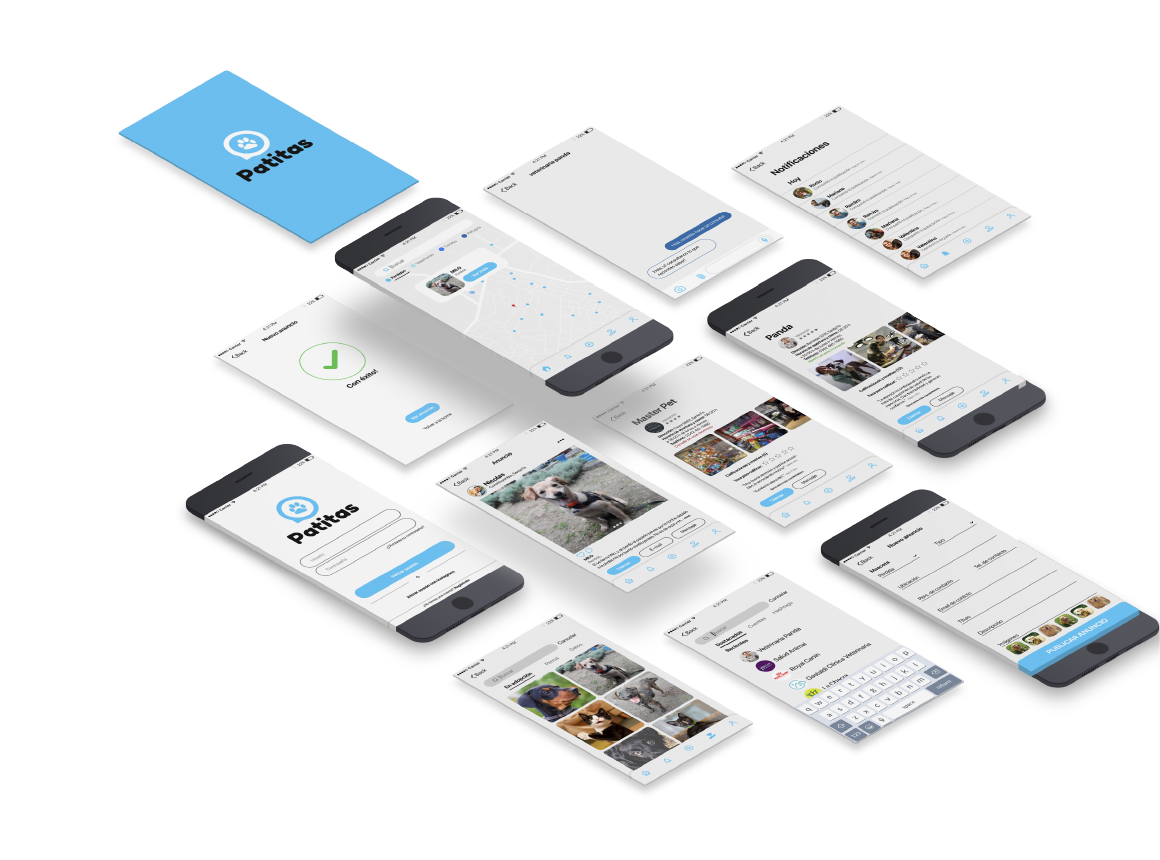
Patitas — final app screens

Continue exploring

More work.

See all projects